Wednesday, 11 April 2018

An Open Public Ecosystem For Record Keeping And Data Security

RecordsKeeper
 
Last few years turned the spotlight onto the Blockchain Technology, and the rest, as they say, is history in the making. Right from basics, everyday financial decisions to unprecedented social and economic impact, we believe that Blockchain has what it takes to change how the world functions.
However, experts believe that the full potential of the incredible Blockchain Technology isn’t yet explored. With every passing day, new use-cases are emerging for Blockchain Technology. Every industry is solving old-age problems or making the entire system more efficient with the help of the Blockchain. But the surface has barely been scratched when it comes to the massive impact.
With the same belief, we are happy to announce, RecordsKeeper – an Open Public Ecosystem (with Mine-able Blockchain) for Record Keeping & Data Security.
Founded by Toshendra Sharma & Rohendra Singh in the November of 2016, RecordsKeeper platform is built to store, share, and manage data-objects safely in the form of a key-value pair with each Blockchain transaction. The ecosystem is fueled by “XRK” tokens which are used to pay the transaction fees based of record size for every record published and is being collected by the miners as a reward for their efforts to conform the transaction over Blockchain using proof-of-work consensus.
The RecordsKeeper’s Private Blockchain can also be set up in any local infrastructure or cloud. Alternatively, users can directly use RecordsKeeper’s Public Blockchain which is maintained by hundreds of miners already and more are joining this mining pool every day. RecordsKeeper consists of passionate developers, marketers, and Blockchain-specialists who believe in what the platform offer to the world at large.
How-RecordsKeeper-Blockchain-Works-for-uploading-records-record-keeping-data-security
RecordsKeeper Blockchain solution for record keeping and data security
Since the platform is based on the Blockchain Technology, which also powers Bitcoin & Other Cryptocurrencies, the data stored on it cannot be deleted, tampered, or edited in any form by anyone including the owner of the Data. This decentralized outlook on how data stored is what makes RecordsKeeper a powerful platform.
Records published on RecordsKeeper are:
Immutable in nature
Verifiable without any trusted third party
Private, if encrypted before publishing
Authentic, cannot be created for old dates
Non-repudiable, once published cannot be denied
Several use-cases for the RecordsKeeper emerges due to fundamental nature of query-able key-value pair based storage system. Some of them are:
RecordsKeeper’s public ledger also offers unlimited storage of data along with encrypted storage. By sending a transaction, this data can be shared with the interested parties. Due to the immutability of this public database, it can be used by millions of users to share and store records in verifiable formats.
As of today, a new block of data is being created every 15 seconds which can be maximum of 8MB with permission Proof-of-Work Consensus. And, for the RecordsKeeper’s team, this is just a beginning.

Monday, 9 April 2018

13 digit mobile numbers


13-Digit Mobile Numbers Get DoT Nod, but Only for M2M Services
The Department of Telecommunications (DoT) has asked telecom service providers to start issuing 13-digit numbers for SIM-based machine-to-machine (M2M) services, which will co-exist with 10-digit numbers.
The DoT had approved the scheme and a letter on it was sent to various departments on February 9, 2018.
M2M services are those where Internet-enabled devices like point-of-sale machines or even latest refrigerators which communicate through a SIM card. This decision will not have any effect on mobile phone SIMs.
During the meeting, it was decided that 13-digit M2M numbering plan will be implemented from July 1, 2018. From this date onwards, all new M2M mobile connections will be allocated 13-digit numbers only.
The DoT said all service providers must ensure that their network elements including IT and other relevant systems are aligned with 13-digit numbering for M2M SIMs before July 1, 2018.
Migration of existing 10-digit M2M numbers to 13 digits will start by October 1, 2018 and shall be completed by December 31, 2018, it said.

Wednesday, 6 September 2017

Why People Root Android Phones?

        And What Is Rooting

Sony Xperia Z2
Sony Corporation
That fantastic new Android phone has an open source operating system, but that doesn't actually make the whole thing open. You see, phone carriers and device manufacturers actually put quite a few modifications and restrictions on your phone. Even Google put restrictions into its own operating system - for safety and security, but also at the request of carriers and phone manufacturers.

What Is "Rooting" Android?

On a basic level, rooting an Android phone means giving yourself superuser access.
What does that mean? If you use a desktop computer that allows multiple user accounts, some of those user accounts have more power than others,right? Administrative accounts allow you to do more, and they're also a little more dangerous - because they allow you to do more. A superuser account on Android is sort of like that administrator account. It allows more access to the operating system. That means more power, but it also means more potential for damage.

You Are Prevented from Rooting for Security

This is to say that phone carriers and even Google is treating you a little like a small child. Don't get me wrong. We are a little like small children when it comes to using our phones. Giving us unfettered access to the  source code means we could easily screw up our phones. More importantly, giving us unfettered access means the apps we run could potentially do a lot of damage. What if you install a malicious app that completely bricks your phone?
Well, lucky for you, you don't have that access. Your user account isn't logged in as root, so all your apps only have permission to play sandboxed areas.

Why Would You Override Security and Root Anyway?

Now, I'm going to turn around and tell you the exact opposite thing. Well, not exactly. I'm not saying rooting is for everyone.
It isn't. It involves hacking your phone and risks that you will break it. However, for some people, rooting is practically a requirement. Rooting your phone gives you total control. You can "flash" variations of the Android operating system that may be more convenient. You can get apps that allow you to have super-powers and do things that the phone carriers and phone makers wouldn't ordinarily allow you to do. Some of those things are perfectly fine, and some may be a bit questionable ethically or legally, so be a good judge. 
Believe it or not, Google is pretty cool with this whole rooting thing. They could make rooting harder. Lots of Android phone makers did. You can find tons of apps designed to run on rooted Android devices in the Google Play store. If Google were out to quash rooting, that would not be the case. While I can't guarantee any particular app is safe or wise, if you're going to install root access apps, sticking to the Google Play store is at least a way to keep out most of the bad actors.

What Are the Consequences of Rooting Your Phone?

Well, you're going to void your warranty. You might also break your phone permanently. You are also now in charge of keeping track of your own Android maintenance.
Any system updates are now your own responsibility. 
Rooting your phone appears to be in a legal gray area. However, unlocking your phone is more clearly forbidden, provided that you purchased that phone after January 1, 2013. What is the difference? Unlocking your phone means that you are changing it in a way to make it interoperable on another carrier. You obviously can't do that with every carrier - different phones use different wireless communication systems, but if you wanted to take your AT&T phone over to T-Mobile, the courts now say you need AT&T's permission to do that. Some methods to root phones may also unlock them.

How to Root Android without Computer without PC

How to Root Android without Computer  without PC


Kingo Android Root has launched its KingoRoot apk for Android, which provides a universal one-click Android root solution for Android users. It is easy to use and saves the trouble to connect to PC via USB cable.
Before jumping into the rooting process, please make sure you get everything right beforehand.
  • Device powered on.
  • At least 50% battery level.
  • Internet connection necessary (Wi-Fi network suggested).
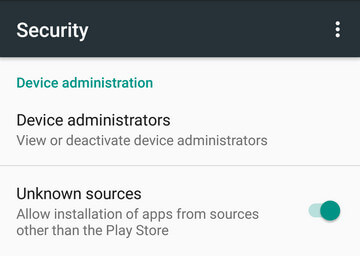
  • Allow installation of apps from unknown sources.
     Settings > Security > Unknown Sources        

Root Android via KingoRoot APK Without PC Step by Step


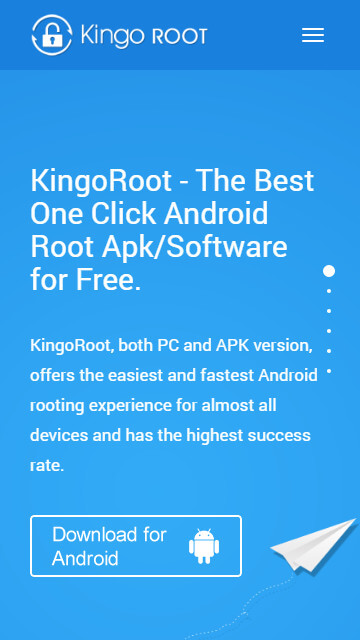
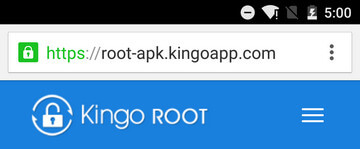
Step 1: Free download KingoRoot.apk.

Root Android with KingoRoot apk, without connecting to PC
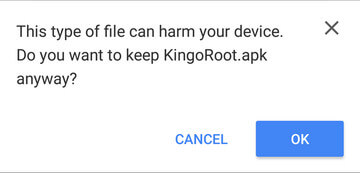
The download will be automatically started. If Chrome has warned you about KingoRoot.apk, click "OK" to proceed.
KingoRoot Apk Download, the best one-click root apk for free
If you are using PC to view this tutorial, you have three choices.

Step 2: Install KingoRoot.apk on your device.

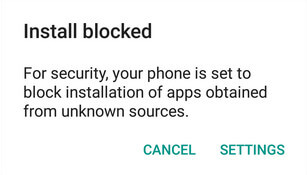
If you didn't check "Unknown Sources" in Settings > Security, then during installation, you will get a prompt "Install blocked", stating that "For security, your phone is set to block installation of apps obtained from unknown sources".
Root any Android device with KingoRoot, the best one-click Android apk root tool.
Just follow phone instructions and install Kingo Root on your device and allow installs from "Unknown Sources".
Root any Android device with KingoRoot, the best one-click Android apk root tool.

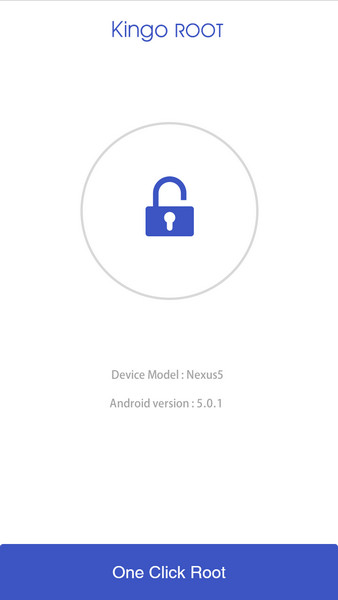
Step 3: Launch "Kingo ROOT" app and start rooting.

Kingo Root is very user-friendly and easy to use. Click "One Click Root" to start the rooting process.
Kingo Root Apk Main Interface

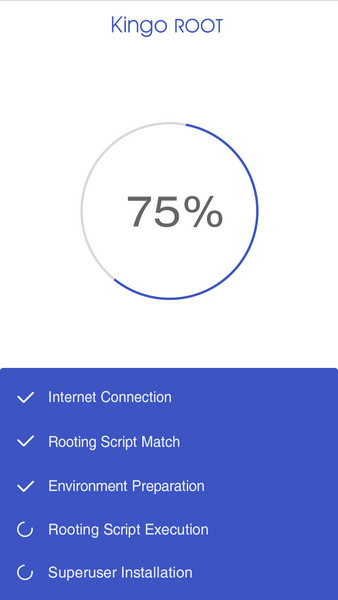
Step 4: Waiting for a few seconds till the result screen appear.

Kingo Root Apk Rooting

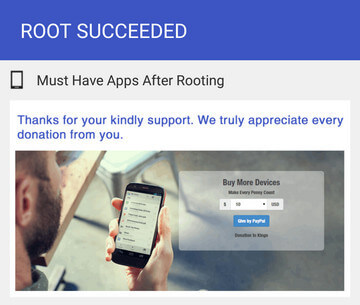
Step 5: Succeeded or Failed.

It is highly recommended that you try several times when rooting with KingoRoot apk version. We have several rooting methods integrated in apk root, however, it will only run one at a time.
Kingo Root Apk Root Succeed

Monday, 4 September 2017

IMPORTANT POINTS TO CONSIDER WHILE BUYING A SMART PHONE
 
​Buying a smartphone: 10 things to consider
1 / 11

​Buying a smartphone: 10 things to consider

Smartphones these days have become an integral part of our lives. We use them for communication, taking pictures, saving documents on the cloud, internet browsing and even as a power bank to charge other smartphones.
 
Build quality
2 / 11

Build quality

Build is all about durability of a smartphone. The entire handset market is largely divided in two types of builds -- metal and plastic.

There are some that even have glass-coated panels, but those are very limited.  
​Display
3 / 11

​Display

The size and resolution of display depends on how you use your smartphone. If you often stream videos, edit photos or videos, or download and view movies, then a smartphone display ranging from 5.5-inch to 6-inch, full-HD or QHD resolution should be good enough for you.

Anything larger than a 6-inch display not just makes the handset extra bulky, but also difficult to carry around. If you are a regular user and largely use the smartphone for checking emails, chatting and browsing social media apps, then anything from 5-inch to 5.5-inch HD or full-HD display handsets is perfect. 
​Processor
4 / 11

​Processor

The processing power of a smartphone varies from one device to another depending on several factors such as OS version, UI, bloatware and more.

If you are a heavy user who need to edit images/videos/documents online, play  
​Camera
5 / 11

​Camera

Just having higher number of megapixels does not mean that the smartphone camera is better. Several specifications such as camera aperture, ISO levels, pixel size, autofocus and more are essential as well. A 16MP rear camera does not necessarily be better than a 12MP camera. Same theory goes for the front-facing camera.

Higher number of pixels mean that the size of the image is bigger, which becomes more sharper when seen on a small screen. A photographer enthusiast might want a camera with 12 or 16MP sensor under f/2.0 or lower aperture for speedy shots even in low lights. A casual shooter can go by even with an 8MP 0r 12MP camera with f/2.0-f/2.2 aperture.
 
​Battery
6 / 11

​Battery

The battery usage differs from user to user depending on the way he/she uses the smartphone. If you are a heavy user and work on apps, play games, stream videos and more then go for a smartphone with at least 3500mAh battery or above. If you are an average or light user, a handset with 3000mAh battery would be good enough to 
User interface/OS version
7 / 11

User interface/OS version

User interface and the OS version too are key factors to consider while choosing a smartphone. These are the interfaces that one would have to interact with each time to access anything, so it should be easy and simple.
 
Storage
8 / 11

Storage

A large part of the smartphone’s storage is taken away from the OS and the apps the device comes pre-installed with.

A 16GB/32GB/64GB or more don’t really come with exact mentioned space. If you like to keep less number of apps on your devices, you can go for 32GB storage. 
Security/extra features
9 / 11

Security/extra features

Most smartphones these days have started coming with extra security features such as fingerprint sensor or even iris sensors. These are not just to lock/unlock a handset but as a password to access certain files, documents or apps.
 
​Audio/speakers
10 / 11

​Audio/speakers

Speakers and the quality of audio coming out of it can be an important parameter for those who rely on heavy video streaming or video conferences. If you like entertainment-on-the-go, buy a handset that has front-facing speakers. This gives clear sound even while holding the smartphone in landscape mode.
 
Headphone jack/USB port
11 / 11

Headphone jack/USB port

Ports too can be a factor to consider. Although both micro-USB and USB Type-C ports are available in smartphones these days, it is preferable to switch to USB Type-C not just because it is easy to plug in but also it is future-proof.

AN OFFICER AND A SPY – ROBERT HARRIS SUMMARY WRITTEN BY-SURYA PRAKASH PATTANAYAK This novel was written by Robert Harris. It has w...